%20-%20https://sketch.com%20--%3e%3ctitle%3esearch_ico%3c/title%3e%3cdesc%3eCreated%20with%20Sketch.%3c/desc%3e%3cg%20id='elements'%20stroke='none'%20stroke-width='1'%20fill='none'%20fill-rule='evenodd'%3e%3cg%20id='svg_elements'%20transform='translate(-372.000000,%20-152.000000)'%20fill='%23131515'%3e%3cpath%20d='M387.655562,160.498039%20C387.655562,162.294118%20386.925169,163.922549%20385.746738,165.102941%20C385.745758,165.104902%20385.743797,165.104902%20385.742816,165.105882%20C385.740856,165.107843%20385.740856,165.108824%20385.739875,165.110784%20C384.558503,166.289216%20382.930071,167.019608%20381.133993,167.019608%20C377.537914,167.019608%20374.612424,164.094118%20374.612424,160.498039%20C374.612424,156.901961%20377.537914,153.976471%20381.133993,153.976471%20C384.730071,153.976471%20387.655562,156.901961%20387.655562,160.498039%20M381.133993,152%20C378.864385,152%20376.730071,152.884314%20375.125169,154.489216%20C373.520267,156.094118%20372.635954,158.228431%20372.635954,160.498039%20C372.635954,162.767647%20373.520267,164.901961%20375.125169,166.506863%20C376.730071,168.112745%20378.863405,168.996078%20381.133993,168.996078%20C383.070267,168.996078%20384.905562,168.348039%20386.399679,167.161765%20L390.948699,171.710784%20C391.134973,171.897059%20391.383993,172%20391.647718,172%20C391.911444,172%20392.159483,171.897059%20392.345758,171.710784%20C392.533012,171.52451%20392.635954,171.276471%20392.635954,171.011765%20C392.635954,170.748039%20392.533012,170.5%20392.346738,170.312745%20L387.797718,165.763725%20C388.983012,164.269608%20389.632032,162.434314%20389.632032,160.498039%20C389.632032,158.228431%20388.747718,156.094118%20387.142816,154.489216%20C385.537914,152.884314%20383.403601,152%20381.133993,152'%20id='search_ico'%3e%3c/path%3e%3c/g%3e%3c/g%3e%3c/svg%3e)
%20-%20https://sketch.com%20--%3e%3ctitle%3ebasket_ico%3c/title%3e%3cdesc%3eCreated%20with%20Sketch.%3c/desc%3e%3cg%20id='elements'%20stroke='none'%20stroke-width='1'%20fill='none'%20fill-rule='evenodd'%3e%3cg%20id='svg_elements'%20transform='translate(-604.000000,%20-152.000000)'%20fill='%23FFFFFF'%20fill-rule='nonzero'%3e%3cpath%20d='M617.885886,152.156132%20C618.251208,151.893333%20618.764816,151.969846%20619.033242,152.328759%20L619.033242,152.328759%20L623.508326,158.308798%20L625.787011,158.308798%20C626.028367,158.308798%20626.257391,158.412965%20626.413369,158.593644%20C626.569346,158.774324%20626.636377,159.013262%20626.596631,159.246552%20L626.596631,159.246552%20L624.544393,171.326984%20C624.478478,171.715449%20624.136145,172%20623.734729,172%20L623.734729,172%20L607.48092,172%20C607.079805,172%20606.737214,171.715154%20606.671257,171.326984%20L606.671257,171.326984%20L604.619019,159.246552%20C604.579358,159.013009%20604.64639,158.774366%20604.802367,158.593686%20C604.958344,158.413007%20605.187368,158.30884%20605.428725,158.30884%20L605.428725,158.30884%20L607.488225,158.30884%20L611.963352,152.328759%20C612.231779,151.970352%20612.745644,151.893038%20613.110966,152.156132%20C613.476287,152.419478%20613.55535,152.923365%20613.286923,153.282026%20L613.286923,153.282026%20L609.525167,158.30884%20L621.471685,158.30884%20L617.709929,153.282026%20C617.44176,152.923661%20617.520307,152.419478%20617.885886,152.156132%20Z%20M624.818105,159.919568%20L606.397674,159.919568%20L608.176286,170.389273%20L623.039492,170.389273%20L624.818105,159.919568%20Z%20M615.607889,161.798742%20C616.061297,161.798742%20616.428767,162.159258%20616.428767,162.604085%20L616.428767,162.604085%20L616.428767,167.892644%20C616.428767,168.337766%20616.061297,168.698028%20615.607889,168.698028%20C615.154481,168.698028%20614.787011,168.337513%20614.787011,167.892686%20L614.787011,167.892686%20L614.787011,162.604085%20C614.787011,162.159258%20615.154481,161.798742%20615.607889,161.798742%20Z%20M619.849179,161.798742%20C620.302587,161.798742%20620.670057,162.159258%20620.670057,162.604085%20L620.670057,162.604085%20L620.670057,167.892644%20C620.6701,168.337766%20620.30263,168.698028%20619.849179,168.698028%20C619.395771,168.698028%20619.028301,168.337513%20619.028301,167.892686%20L619.028301,167.892686%20L619.028301,162.604085%20C619.028301,162.159258%20619.395771,161.798742%20619.849179,161.798742%20Z%20M611.366599,161.798742%20C611.820007,161.798742%20612.187478,162.159258%20612.187478,162.604085%20L612.187478,162.604085%20L612.187478,167.892644%20C612.187478,168.337766%20611.820007,168.698028%20611.366599,168.698028%20C610.913191,168.698028%20610.545721,168.337513%20610.545721,167.892686%20L610.545721,167.892686%20L610.545721,162.604085%20C610.545721,162.159258%20610.913191,161.798742%20611.366599,161.798742%20Z'%20id='basket_ico'%3e%3c/path%3e%3c/g%3e%3c/g%3e%3c/svg%3e)
Mechanical keys are simple until access has to be shared, limited, changed or revoked. A home guest, a cleaner, a short-term rental visitor, a warehouse employee and a service contractor all create the same question: how can a door be opened without handing out another physical key?
Keyless door access is not one product category. A smart lock can make an existing door easier to manage. A keypad can let people enter without a phone. A bridge can add remote control. An access control reader can become part of a wider business access system with cards, mobile credentials, logs, hubs and electric locks.
This article explains where Tedee smart locks make sense, where Ubiquiti UniFi Access is a better fit, and what should be checked before choosing a solution for a home, apartment, small office, rental property, warehouse or technical room.
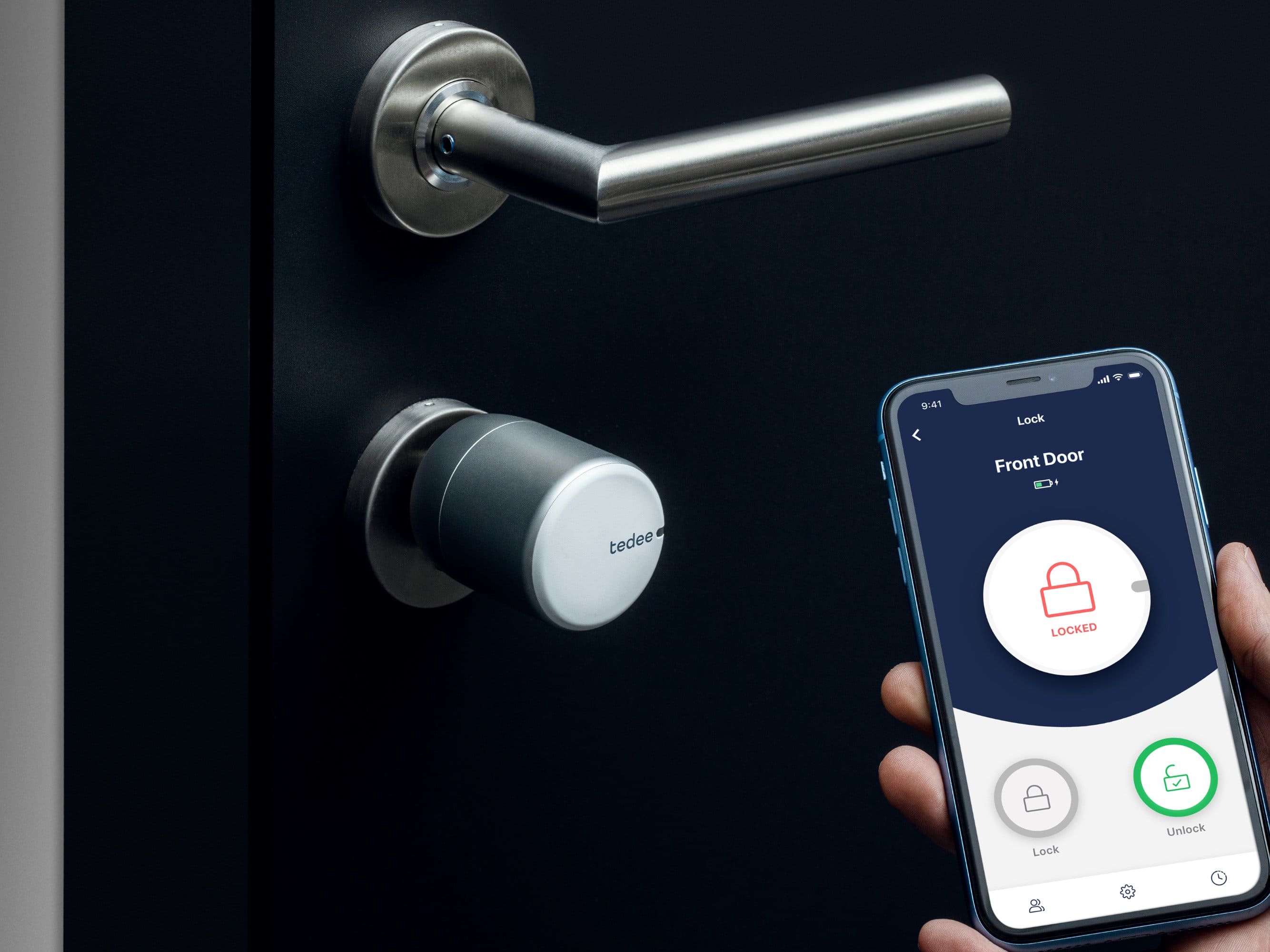
Smart lock control through a mobile app
Key takeaways
- Tedee GO 2 is a practical way to make an existing compatible door smart without building a full access control system.
- Tedee Smart Lock Pro is the more premium Tedee option when the lock should feel like a permanent part of the door setup.
- A Tedee smart lock is installed on the inside of the door. From outside, the user unlocks it through the app, auto-unlock or Tedee Keypad Pro. A mechanical key should remain available as backup where the cylinder allows it.
- Tedee Bridge is useful when remote access, notifications, activity history or remote permission sharing are required.
- Tedee Keypad Pro is useful when someone needs to enter without a phone, for example with a PIN or fingerprint.
- UniFi Access is better for offices, warehouses, stores and technical rooms where access needs to be managed through readers, hubs, cards, mobile credentials, logs and door hardware.
- Before choosing any solution, check the door type, cylinder, power, installation environment, unlock methods, user count and emergency access plan.
Table of contents
- Why do mechanical keys become difficult to manage?
- What are the main ways to open a door without a key?
- How does a Tedee smart lock work from the outside?
- When is Tedee GO 2 enough?
- When does Tedee Smart Lock Pro make more sense?
- When do Tedee Bridge and Tedee Keypad Pro become useful?
- When is UniFi Access the better solution?
- Tedee vs UniFi Access: what is the real difference?
- Access parameters to check before choosing
- When it helps / When it will not help
- Practical scenarios
- What to check before installation
- Conclusion
- Sources and references
- FAQ
Why do mechanical keys become difficult to manage?
The problem starts when access stops being personal and permanent. A key must be given to a guest, employee, cleaner, contractor, courier or tenant. Later it must be returned, replaced or treated as a security risk if the person should no longer have access.
In a home, this is usually a convenience issue. In a rental property, it becomes an operational issue. In an office, warehouse or technical room, it becomes a control and accountability issue.
A mechanical key cannot be disabled instantly. It cannot be limited to a time window. It does not show who opened the door. That is why keyless access becomes useful when several people use the same door or when access changes over time.
What are the main ways to open a door without a key?
The right unlock method depends on who uses the door and how much control is needed. In simple residential setups, a phone app, auto-unlock and a keypad may be enough. In business setups, NFC cards, mobile credentials, readers, PINs, schedules and access logs often become more important.
Common unlock methods include:
- smartphone app or Bluetooth unlock for regular users;
- auto-unlock when an authorized user approaches the door;
- PIN code or fingerprint through an external keypad;
- mechanical key as backup access;
- NFC cards or keyfobs in professional access systems;
- mobile credentials such as Touch Pass in compatible UniFi Access setups;
- Face Unlock, QR code, visitor flow or intercom features on compatible UniFi Access readers.
These methods should not be mixed randomly. A family home, a rental apartment and a warehouse normally need different combinations.
How does a Tedee smart lock work from the outside?
Tedee GO 2 and Tedee Smart Lock Pro are installed on the inside of the door. The smart lock turns the cylinder from inside the property. From outside, the user does not touch the lock body directly. Instead, the user sends an unlock command.
With a Tedee setup, the door can be opened from outside in several ways:
- through the Tedee app;
- through auto-unlock, if it is configured for the user and location;
- through Tedee Keypad Pro, if it is installed outside the door;
- with a normal mechanical key, if the cylinder supports that use case.
This is why the cylinder matters. For Tedee GO 2, the existing European cylinder must support emergency or double-clutch operation: the door should still be possible to unlock from outside with a key even when the smart lock is installed inside. Tedee cards are not part of this setup. Card-based access belongs more naturally to systems such as UniFi Access.
When is Tedee GO 2 enough?
Tedee GO 2 is a simple way to make an existing compatible door smart. It is designed for installation on an existing Euro-profile cylinder and does not require drilling or replacing the whole door hardware in typical supported installations.
The device works as a key-turner inside the property. It is a good fit when the main goal is to reduce everyday dependence on physical keys without turning the door into a full access control project.
Tedee GO 2 is especially relevant for apartments, homes, small offices, cabinets, individual rooms and rental properties where the access logic is simple: a limited number of users, occasional guests and a need for convenient app-based or keypad-based entry.
It is not the right choice when the project requires employee badge access, multiple doors, PoE-powered readers, central access policies or integration with wider building security hardware.
When does Tedee Smart Lock Pro make more sense?
Tedee Smart Lock Pro is the more premium option in the Tedee line. It is worth considering when the smart lock should feel like a permanent, clean and more refined part of the door setup.
This can make sense for the main entrance in a home or apartment, a small office, a private room or a premium rental apartment where the hardware should look and feel more polished.
The model works through Bluetooth, uses a rechargeable Li-Ion battery, is intended for indoor installation and can work together with Tedee Bridge and Tedee Keypad Pro. The decision between GO 2 and Pro should not be framed as “bad vs good”. GO 2 is the simpler entry option. Pro is the more premium option for a more finished installation.
When do Tedee Bridge and Tedee Keypad Pro become useful?
A Tedee smart lock can already unlock the door through the app and Bluetooth. Bridge and Keypad Pro do not mean that the lock is incomplete. They expand the scenarios in which the system is easier to use.
Tedee Bridge connects the smart lock to the internet through the home Wi-Fi network. It is useful when the door needs to be opened remotely, when the owner wants to check lock status, receive notifications, review activity or give access to someone who is already at the door while the owner is away.
Tedee Keypad Pro adds entry without a phone and without a physical key. A user can unlock the door with a PIN code or fingerprint, depending on the configured setup. This is useful for children, guests, employees, cleaning services, maintenance visits and short-term rental stays.
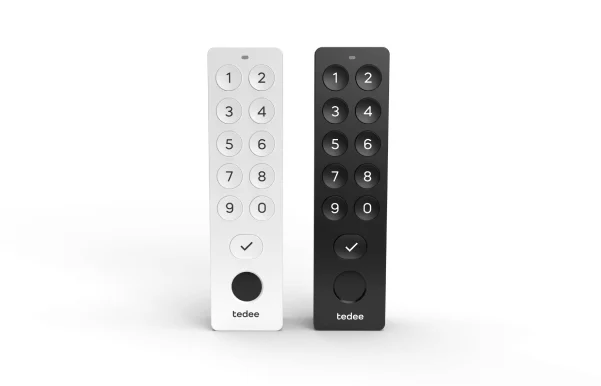
Tedee Keypad Pro for entry without a phone or physical key
For short-term rental and self-check-in, the strongest Tedee setup is usually smart lock plus Bridge plus Keypad Pro. The guest can enter with a code, while the owner can manage access remotely and avoid handing over a physical key.
When is UniFi Access the better solution?
UniFi Access is a different type of solution. It is not simply a smart lock for one door. It is a door access system built around readers, hubs, credentials, door hardware and central management.
It becomes the better fit when the door is part of a business or infrastructure environment: an office entrance, warehouse, server room, technical area, store, staff entrance or service zone.
A UniFi Access door usually includes a reader, a hub, an electric lock or strike, a request-to-exit button, a door position sensor and access credentials such as NFC cards, keyfobs or mobile credentials. The exact setup depends on the door and the required security model.
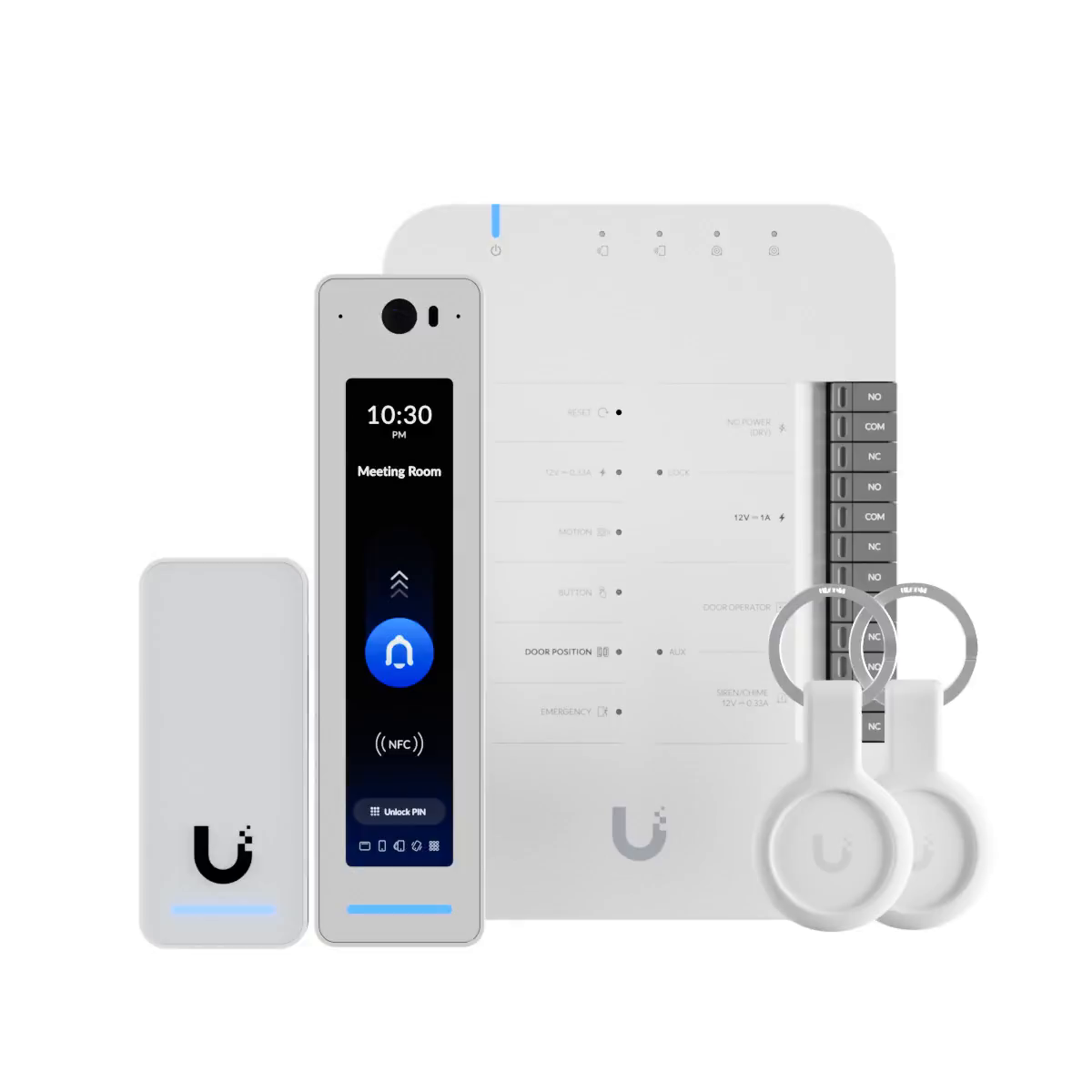
UniFi Access components: reader, hub and key fobs
Ubiquiti reader models vary by feature level. More advanced readers such as G3 Reader Pro are relevant when the entrance needs more than a simple tap-to-unlock experience: display, camera, microphone, NFC/BLE, PoE power and richer visitor interaction can all matter depending on the door role and UniFi Access version.
Tedee vs UniFi Access: what is the real difference?
| Feature | Tedee smart lock setup | UniFi Access setup | Why it matters |
| Main role | Upgrade an existing compatible door | Build a managed door access system | The first is a door-level smart lock; the second is infrastructure. |
| Typical users | Homeowners, tenants, small offices, rental hosts | Offices, warehouses, shops, technical rooms, staff entrances | The number and type of users change the required system. |
| Unlock methods | App, auto-unlock, keypad, mechanical key backup | NFC cards, mobile credentials, PIN, readers, Touch Pass, Face Unlock or QR on compatible models | Business access often needs several credential types. |
| Installation style | Inside the door, usually without major wiring | Reader and hub installation, door hardware wiring and PoE/network planning | Access control needs more planning but scales better. |
| Cards | Not the normal Tedee access method | Natural part of the system | Card access is usually a business access control requirement. |
| Best fit | One door or a small number of simple doors | Multiple users, managed permissions and door logs | The use case should decide the product. |
Access parameters to check before choosing
| Parameter | Why it matters |
| Door and cylinder type | A smart lock depends on the existing cylinder and door mechanics. |
| Emergency key access | A backup key should remain usable where the cylinder and installation allow it. |
| Latch retraction | Some doors need the latch pulled in, not only the lock turned. |
| Unlock methods | Phone, auto-unlock, PIN, fingerprint, cards and mobile credentials solve different access problems. |
| Remote access | Tedee needs Bridge for remote scenarios; UniFi Access needs its own controller and network setup. |
| Power method | Smart locks use batteries or rechargeable batteries; UniFi readers and hubs commonly rely on PoE and door hardware power. |
| Indoor / outdoor use | Outdoor keypads and readers need appropriate environmental ratings. |
| User count and permissions | A family door and a staff entrance need different permission models. |
| Activity history | Logs matter more in offices, rentals, warehouses and technical rooms than in a simple home door. |
| Emergency plan | Battery, phone loss, power loss and network failure should be considered before installation. |
When it helps / When it will not help
When it helps
- temporary access needs to be issued without copying a key;
- guests, cleaners, staff or contractors need controlled access;
- the owner wants to see activity history or receive notifications;
- a rental property needs self-check-in;
- an office or warehouse needs user permissions and door logs;
- a business wants cards, mobile credentials or reader-based access.
When it will not help
- the door or cylinder is mechanically unsuitable or already unreliable;
- the selected device is not rated for the installation environment;
- a full certified building access system is required but a residential smart lock is chosen;
- there is no clear plan for who should manage access;
- backup access during battery, phone, network or power failure has not been considered;
- physical door security is weak and the electronic layer is expected to solve everything.
Typical mechanical key vs keyless access solution
| Feature | Typical mechanical key | Keyless access solution | Why it matters |
| Access sharing | A physical key must be handed over | Access can be issued through app, PIN, fingerprint, card or mobile credential | Useful for guests, staff and service visits. |
| Revocation | The key must be returned or the cylinder changed | The access right can be removed in the system | Reduces risk after staff change or rental checkout. |
| Temporary access | Awkward to manage | Can be limited by user or time period | Important for rentals and contractors. |
| Event history | Usually unavailable | Available in app or access system, depending on setup | Useful for accountability and troubleshooting. |
| Backup | Key works if the lock is functional | Needs a defined backup plan | Battery and power scenarios must be planned. |
| Scaling | Difficult as user count grows | Easier to scale with users, credentials and policies | Important for offices and warehouses. |
Practical scenarios
Apartment or private house
A Tedee GO 2 or Tedee Smart Lock Pro setup is usually enough when the goal is simple keyless access for a limited number of users. If remote control or notifications are needed, add Tedee Bridge. If people should enter without the app, add Tedee Keypad Pro.
Short-term rental
A smart lock plus Bridge plus Keypad Pro is the most practical Tedee combination. The guest can receive a PIN for the stay, while the owner can manage access remotely and avoid physical key handover. This is useful for self-check-in, but it still requires a proper backup access plan.
Small office
If it is one door and a small team, Tedee may be enough. If cards, central user management, schedules, access logs and UniFi infrastructure are required, UniFi Access is the stronger direction.
Warehouse, server room or technical space
UniFi Access is usually more appropriate. These rooms often need managed permissions, reliable power, door hubs, exit buttons, door position sensors and a clear emergency access method.
Store, service zone or staff entrance
UniFi Access can separate employee, visitor and technical staff access. Reader Pro or Intercom-style setups can be useful when the entrance needs not only authorization but also a screen, camera, audio or visitor flow.
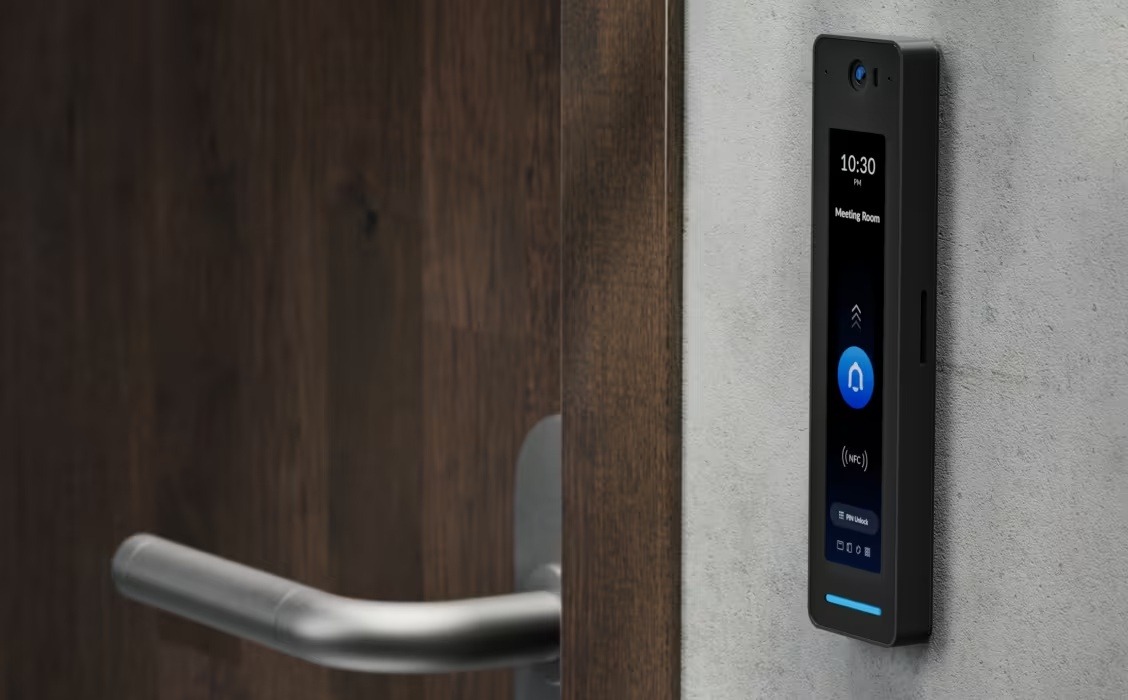
UniFi Access reader installed at an entry point
What to check before installation
For Tedee
- cylinder compatibility and whether an adapter is required;
- whether the door can still be opened from outside with a key;
- whether latch retraction is needed for this door;
- where the Bridge will be placed if remote access is required;
- whether Keypad Pro should be installed outside the door;
- who will manage users and access rights;
- what the backup plan is for low battery, lost phone or failed auto-unlock.
For UniFi Access
- how many doors need to be controlled;
- which reader model is appropriate for each door;
- which lock type will be used and whether it should be fail-safe or fail-secure;
- where the hub will be installed;
- whether PoE and network cabling are available;
- whether exit buttons and door position sensors are needed;
- which credential types will be used: cards, keyfobs, mobile credentials, PIN, Touch Pass or Face Unlock;
- who will manage users, schedules, logs and permissions.
Conclusion
The right keyless access solution depends on the door scenario, not only on the product name. A single apartment door, a rental unit, a small office, a warehouse and a staff entrance require different levels of control.
For a simple upgrade of an existing compatible door, Tedee GO 2 or Tedee Smart Lock Pro can be the practical route. Bridge and Keypad Pro extend the system when remote access, PIN entry, fingerprints or self-check-in matter.
For business access, UniFi Access is usually the more scalable approach. It is built around readers, hubs, credentials, logs and door hardware, which makes it more suitable for managed access in offices, warehouses, stores and technical areas.
A good decision starts with one question: who needs to open this door, how often, by which method, and how quickly should access be removable when it is no longer needed?
Sources and references
- Tedee GO 2 Smart Lock Silver - Getic product page
- Tedee Smart Lock Pro Black - Getic product page
- Tedee Bridge - Getic product page
- Tedee Keypad Pro Black - Getic product page
- Tedee GO2 official product information
- Tedee Keypad PRO knowledge base
- Tedee Door Sensor / Bridge / Keypad product information
- Ubiquiti - Choosing a UniFi Access Reader
- Ubiquiti G3 Reader Pro technical specifications
- Ubiquiti G2 Reader Pro technical specifications
- Ubiquiti G3 Reader technical specifications
- Ubiquiti - Configuring NFC Cards in UniFi Access


