%20-%20https://sketch.com%20--%3e%3ctitle%3esearch_ico%3c/title%3e%3cdesc%3eCreated%20with%20Sketch.%3c/desc%3e%3cg%20id='elements'%20stroke='none'%20stroke-width='1'%20fill='none'%20fill-rule='evenodd'%3e%3cg%20id='svg_elements'%20transform='translate(-372.000000,%20-152.000000)'%20fill='%23131515'%3e%3cpath%20d='M387.655562,160.498039%20C387.655562,162.294118%20386.925169,163.922549%20385.746738,165.102941%20C385.745758,165.104902%20385.743797,165.104902%20385.742816,165.105882%20C385.740856,165.107843%20385.740856,165.108824%20385.739875,165.110784%20C384.558503,166.289216%20382.930071,167.019608%20381.133993,167.019608%20C377.537914,167.019608%20374.612424,164.094118%20374.612424,160.498039%20C374.612424,156.901961%20377.537914,153.976471%20381.133993,153.976471%20C384.730071,153.976471%20387.655562,156.901961%20387.655562,160.498039%20M381.133993,152%20C378.864385,152%20376.730071,152.884314%20375.125169,154.489216%20C373.520267,156.094118%20372.635954,158.228431%20372.635954,160.498039%20C372.635954,162.767647%20373.520267,164.901961%20375.125169,166.506863%20C376.730071,168.112745%20378.863405,168.996078%20381.133993,168.996078%20C383.070267,168.996078%20384.905562,168.348039%20386.399679,167.161765%20L390.948699,171.710784%20C391.134973,171.897059%20391.383993,172%20391.647718,172%20C391.911444,172%20392.159483,171.897059%20392.345758,171.710784%20C392.533012,171.52451%20392.635954,171.276471%20392.635954,171.011765%20C392.635954,170.748039%20392.533012,170.5%20392.346738,170.312745%20L387.797718,165.763725%20C388.983012,164.269608%20389.632032,162.434314%20389.632032,160.498039%20C389.632032,158.228431%20388.747718,156.094118%20387.142816,154.489216%20C385.537914,152.884314%20383.403601,152%20381.133993,152'%20id='search_ico'%3e%3c/path%3e%3c/g%3e%3c/g%3e%3c/svg%3e)
%20-%20https://sketch.com%20--%3e%3ctitle%3ebasket_ico%3c/title%3e%3cdesc%3eCreated%20with%20Sketch.%3c/desc%3e%3cg%20id='elements'%20stroke='none'%20stroke-width='1'%20fill='none'%20fill-rule='evenodd'%3e%3cg%20id='svg_elements'%20transform='translate(-604.000000,%20-152.000000)'%20fill='%23FFFFFF'%20fill-rule='nonzero'%3e%3cpath%20d='M617.885886,152.156132%20C618.251208,151.893333%20618.764816,151.969846%20619.033242,152.328759%20L619.033242,152.328759%20L623.508326,158.308798%20L625.787011,158.308798%20C626.028367,158.308798%20626.257391,158.412965%20626.413369,158.593644%20C626.569346,158.774324%20626.636377,159.013262%20626.596631,159.246552%20L626.596631,159.246552%20L624.544393,171.326984%20C624.478478,171.715449%20624.136145,172%20623.734729,172%20L623.734729,172%20L607.48092,172%20C607.079805,172%20606.737214,171.715154%20606.671257,171.326984%20L606.671257,171.326984%20L604.619019,159.246552%20C604.579358,159.013009%20604.64639,158.774366%20604.802367,158.593686%20C604.958344,158.413007%20605.187368,158.30884%20605.428725,158.30884%20L605.428725,158.30884%20L607.488225,158.30884%20L611.963352,152.328759%20C612.231779,151.970352%20612.745644,151.893038%20613.110966,152.156132%20C613.476287,152.419478%20613.55535,152.923365%20613.286923,153.282026%20L613.286923,153.282026%20L609.525167,158.30884%20L621.471685,158.30884%20L617.709929,153.282026%20C617.44176,152.923661%20617.520307,152.419478%20617.885886,152.156132%20Z%20M624.818105,159.919568%20L606.397674,159.919568%20L608.176286,170.389273%20L623.039492,170.389273%20L624.818105,159.919568%20Z%20M615.607889,161.798742%20C616.061297,161.798742%20616.428767,162.159258%20616.428767,162.604085%20L616.428767,162.604085%20L616.428767,167.892644%20C616.428767,168.337766%20616.061297,168.698028%20615.607889,168.698028%20C615.154481,168.698028%20614.787011,168.337513%20614.787011,167.892686%20L614.787011,167.892686%20L614.787011,162.604085%20C614.787011,162.159258%20615.154481,161.798742%20615.607889,161.798742%20Z%20M619.849179,161.798742%20C620.302587,161.798742%20620.670057,162.159258%20620.670057,162.604085%20L620.670057,162.604085%20L620.670057,167.892644%20C620.6701,168.337766%20620.30263,168.698028%20619.849179,168.698028%20C619.395771,168.698028%20619.028301,168.337513%20619.028301,167.892686%20L619.028301,167.892686%20L619.028301,162.604085%20C619.028301,162.159258%20619.395771,161.798742%20619.849179,161.798742%20Z%20M611.366599,161.798742%20C611.820007,161.798742%20612.187478,162.159258%20612.187478,162.604085%20L612.187478,162.604085%20L612.187478,167.892644%20C612.187478,168.337766%20611.820007,168.698028%20611.366599,168.698028%20C610.913191,168.698028%20610.545721,168.337513%20610.545721,167.892686%20L610.545721,167.892686%20L610.545721,162.604085%20C610.545721,162.159258%20610.913191,161.798742%20611.366599,161.798742%20Z'%20id='basket_ico'%3e%3c/path%3e%3c/g%3e%3c/g%3e%3c/svg%3e)
In a network rack, the problem is not always the switch, the router, or the internet line. Very often, the first thing that makes maintenance slow is much simpler: too many identical patch cables, unclear cable paths, and no visual logic behind the installation.
At first, this may look like a small detail. But in real office networks, server cabinets, and installer projects, cable readability affects how quickly a line can be traced, replaced, documented, or checked during troubleshooting.
Broadbe Slim Patch Cables 5G/10G are designed for this kind of practical infrastructure work. They combine slim cable design, multiple colors, short rack-friendly lengths, 5GbE and 10GbE options, and packaging suitable for both single replacements and larger installations.

Broadbe Slim Patch Cables in a network rack
Key takeaways
- A clean rack is not only about appearance. It makes troubleshooting, documentation, and equipment replacement faster.
- Color-coded patch cables help separate uplinks, access points, cameras, workstations, management links, and spare lines visually.
- Slim patch cables reduce cable volume in dense racks, improve port visibility, and make routing between patch panels and switches easier.
- Broadbe offers 5G Cat6 and 10G Cat6A slim patch cable options for different network requirements.
- The 10G version is based on Cat6A, supports up to 10GbE, uses STP shielding, and has a 4 mm outer diameter.
- The 5G version is based on Cat6, supports up to 5GbE, uses UTP construction, and has an ultra-thin 2.5 mm outer diameter.
- Different colors, short lengths, and 12-pack options make the cables practical for installers, IT teams, offices, and rack cabinet projects.
Table of contents
- Why do network racks become hard to maintain?
- How does color coding reduce mistakes?
- What makes Broadbe Slim Patch Cables different from regular patch cords?
- Where does the 5G/10G cable range fit best in real use?
- Technical specifications
- Typical patch cable vs Broadbe Slim Patch Cable
- Where Broadbe Slim Patch Cables help most
- When they are not the best choice
- What to check before choosing patch cables
- Sources / References
- FAQ
Why do network racks become hard to maintain?
Most racks start clean. Then new devices are added, temporary links become permanent, switches are replaced, and one more cable is installed because it is faster than tracing the old one. After a while, the rack still works, but it becomes difficult to read.
The problem is not only visual clutter. If every cable has the same color and similar length, it becomes harder to understand which line goes to a camera, an access point, a workstation, an uplink, or a management port. During maintenance, this increases the chance of disconnecting the wrong line or spending unnecessary time on basic tracing.
This is why patch cables should be treated as part of the network design, not only as accessories. The right length, color, flexibility, and connector shape can make a dense cabinet much easier to service.
How does color coding reduce mistakes?
Color coding gives the rack a simple visual language. Instead of relying only on labels or memory, the technician can immediately distinguish groups of connections by purpose.
For example, one color can be used for access points, another for cameras, another for uplinks, another for workstation lines, and another for management or temporary service connections. The exact scheme depends on the network, but the principle is the same: the cable color should help explain the installation before anyone starts pulling cables.
This is especially useful when several people maintain the same infrastructure. A clear color logic reduces guesswork, speeds up troubleshooting, and makes future changes easier to understand.
A practical color plan may look like this:
- Blue for office workstations
- Green for access points
- Orange for uplinks or important inter-switch links
- Purple for management or special-purpose connections
- White or black for general patching, depending on the cabinet design
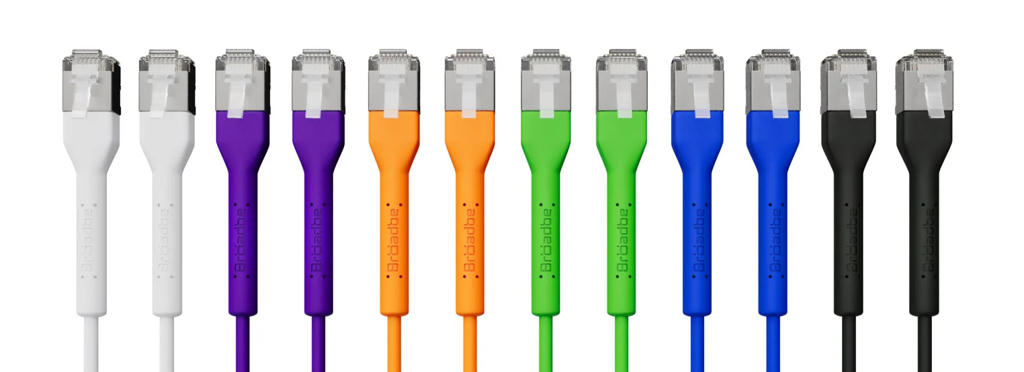
Color options for visual cable separation
What makes Broadbe Slim Patch Cables different from regular patch cords?
Broadbe Slim Patch Cables are built around practical installation needs. The main idea is not just speed, but a cleaner and more manageable cable layout inside racks, offices, and compact networking spaces.
The slim design helps reduce the cable bundle volume compared with thicker standard patch cords. In a rack cabinet, this matters because cables should not block ports, hide indicators, restrict airflow, or make patch panels difficult to service.
The available colors support clear visual separation of lines. The available short lengths make it easier to connect patch panels and switches without leaving unnecessary loops of cable inside the rack. The 12-pack options are also useful when a whole cabinet or office area needs to be wired in one consistent style.
Another practical detail is the bendable RJ45 connector. On the Getic product page, Broadbe describes a connector that can be used in tight spaces and requires only 23 mm of clearance. This is useful behind cabinets, desks, media furniture, and compact wall outlets where a normal straight connector may be harder to route cleanly.
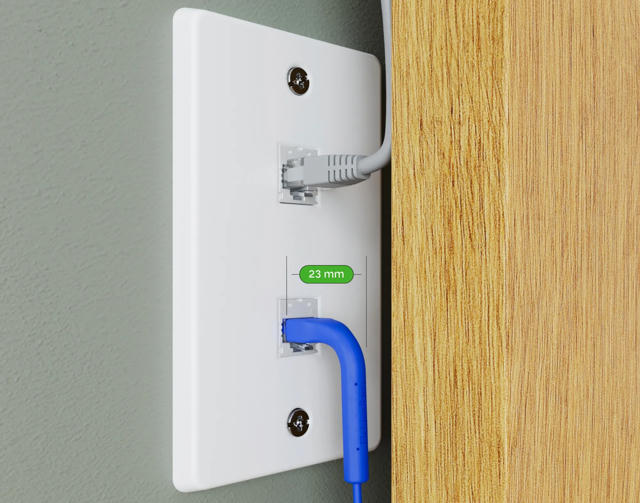
Bendable RJ45 connector for tight-space installations
Where does the 5G/10G cable range fit best in real use?
1. Rack cabinets and patch panels
Short slim patch cables are especially useful between patch panels and switches. They help keep the front of the rack readable and reduce unnecessary cable loops. This is important in 10-inch and 19-inch cabinets, small server rooms, office network corners, and compact technical spaces.
2. Office networks and equipment upgrades
When an office upgrades switches, access points, or workstations, patch cables are often replaced as part of the same installation. Using consistent lengths and colors makes the result easier to maintain after the installation team leaves.
3. System integrator and installer work
For installers, repeatability matters. A 12-pack of the same length and color is easier to plan, carry, and install than a mixed set of random cables. It also makes the final cabinet look more professional and easier for the customer to understand.
4. 2.5G, 5G, and 10G local network links
The 5G Cat6 version fits many modern office and home network upgrades where 1G is no longer enough, but full 10G is not required everywhere. The 10G Cat6A version is the stronger option for higher-load links, 10GbE equipment, NAS connections, and denser network setups.
Technical specifications
The table below summarizes the Broadbe Slim Patch Cable range based on the available Getic product pages and Broadbe conformity documents.
| Specification | Broadbe Slim Patch Cable 5G | Broadbe Slim Patch Cable 10G |
| Cable category | Cat6 | Cat6A |
| Maximum data rate | Up to 5Gbps | Up to 10Gbps |
| Shielding / insulation | UTP | STP |
| Conductor | 32AWG stranded copper | 32AWG stranded copper |
| Outer diameter | 2.5 mm | 4 mm |
| Connector | RJ45 with bendable connector design | RJ45 with bendable connector design |
| Tight-space clearance | 23 mm clearance noted on product pages | 23 mm clearance noted on product pages |
| PoE support | Up to PoE+++ | Up to PoE+++ |
| Available colors | Black, white, blue, green, purple, orange, multicolor | Black, white, blue, green, purple, orange, multicolor |
| Available lengths | 0.1 m, 0.3 m, 1 m, 2 m, 3 m, 5 m, 8 m, 12 m, 20 m | 0.1 m, 0.3 m, 1 m, 2 m, 3 m, 5 m, 8 m, 12 m, 20 m |
| Packaging | Single unit and 12-pack options | Single unit and 12-pack options |
| Environment | Indoor | Indoor |
| Compliance documentation | EU Declaration of Conformity for Slim Patch Cable CAT6 5Gbps series BTP-I32C6 | EU Declaration of Conformity for Slim Patch Cable CAT6A 10Gbps series BTP-I32C6A |
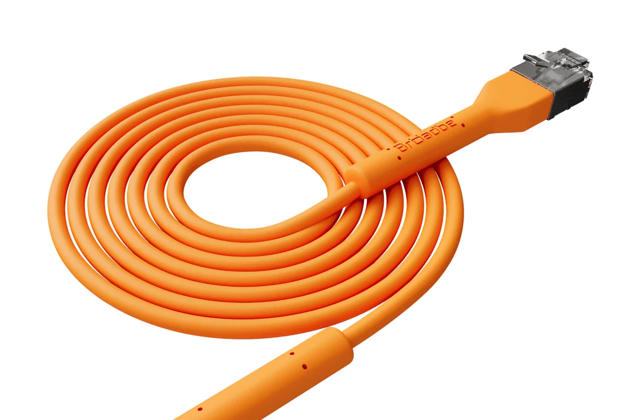
Typical patch cable vs Broadbe Slim Patch Cable
| Feature | Typical patch cable | Broadbe Slim Patch Cable | Why it matters |
| Cable volume | Often thicker and less flexible | Slim 2.5 mm or 4 mm design | Reduces clutter in dense racks and tight spaces. |
| Color planning | Often one color used everywhere | Multiple colors and multicolor packsMakes lines easier to identify and document. | |
| Rack installation | May leave unnecessary loops if length is not matched | Short lengths available for patch panels and switches | Keeps rack fronts cleaner and easier to service. |
| Connector behavior | Standard connector may need more rear clearance | Bendable RJ45 connector with 23 mm clearance | Useful behind cabinets, desks, wall outlets, and tight installations. |
| Speed options | Often chosen without matching the network role | 5G Cat6 and 10G Cat6A options | Lets installers match the cable to the actual link requirement. |
| Bulk work | Often bought individually | Single unit and 12-pack packaging | More practical for office, rack, and installer projects. |
| Maintenance | Harder to trace when all cables look the same | Clearer visual structure when colors and lengths are planned | Reduces mistakes during troubleshooting and replacements. |
Where Broadbe Slim Patch Cables help most
- In network racks where many patch cables are concentrated in a small space.
- Between patch panels and switches, where short and readable cable runs matter.
- In office networks where access points, cameras, workstations, and uplinks should be visually separated.
- For system integrators who need consistent cable colors and lengths across multiple installations.
- In compact cabinets, behind desks, and near wall outlets where connector clearance is limited.
- When cable bundles should not hide ports, indicators, labels, or airflow paths.
- When a customer buys networking equipment and needs suitable patch cables to complete the installation properly.
When they are not the best choice
- If the installation is outdoors or exposed to weather, an indoor patch cable is not the right product category.
- If the task is permanent structured cabling inside walls or ceilings, bulk installation cable may be more appropriate than finished patch cords.
- If the network requires fiber, DAC, or SFP-based links, patch cables are only part of the wider infrastructure plan.
- If there is no documentation or port labeling at all, color coding helps but does not replace proper network documentation.
- If full 10GbE performance is required, the 10G Cat6A version is the more appropriate option than the 5G Cat6 line.
What to check before choosing patch cables
- Choose the correct speed class. Use 5G Cat6 for cost-effective multi-gig links and 10G Cat6A where 10GbE or higher-load links are expected.
- Plan cable colors before installation. The color scheme should reflect the network logic, not random availability.
- Match the cable length to the rack. Short patch-panel connections usually look cleaner with 0.1 m, 0.3 m, or 1 m cables, depending on the layout.
- Check connector clearance. If the cable goes behind furniture, wall plates, or compact cabinets, the bendable RJ45 connector can be useful.
- Decide whether single units or 12-pack packaging makes more sense. For cabinet work and repeated installations, packs are usually easier to manage.
- Do not use color alone as documentation. Labels, port maps, and basic network records are still important.
Conclusion
Patch cables are easy to underestimate because they are small and inexpensive compared with routers, switches, access points, and cabinets. But in practice, they strongly affect how clean, readable, and serviceable the network becomes after installation.
Broadbe Slim Patch Cables are useful because they address several practical details at once: slim cable design, clear color options, short rack-friendly lengths, 5G and 10G variants, bendable RJ45 connectors, and packaging suitable for both single replacements and larger deployments.
For homes, offices, server cabinets, installers, and system integrators, the value is simple: the cable layout becomes easier to understand, easier to service, and less likely to turn into a confusing bundle of identical lines.
Sources / References
- Broadbe official website and product range - Broadbe | Professional Networking Hardware
- Broadbe Slim Patch Cable 10G White 1m on Getic - https://www.getic.com/product/broadbe-slim-patch-cable-10g-white-1m
- Broadbe Slim Patch Cable 5G Orange 3m 12-pack on Getic - https://www.getic.com/product/broadbe-slim-patch-cable-5g-orange-3m-12-pack
- EU Declaration of Conformity for Broadbe Slim Patch Cable CAT6A 10Gbps, BTP-I32C6A series
- EU Declaration of Conformity for Broadbe Slim Patch Cable CAT6 5Gbps, BTP-I32C6 series
- Broadbe rack cabinet assembly manuals for rack installation context - Broadbe | Professional Networking Hardware


