%20-%20https://sketch.com%20--%3e%3ctitle%3esearch_ico%3c/title%3e%3cdesc%3eCreated%20with%20Sketch.%3c/desc%3e%3cg%20id='elements'%20stroke='none'%20stroke-width='1'%20fill='none'%20fill-rule='evenodd'%3e%3cg%20id='svg_elements'%20transform='translate(-372.000000,%20-152.000000)'%20fill='%23131515'%3e%3cpath%20d='M387.655562,160.498039%20C387.655562,162.294118%20386.925169,163.922549%20385.746738,165.102941%20C385.745758,165.104902%20385.743797,165.104902%20385.742816,165.105882%20C385.740856,165.107843%20385.740856,165.108824%20385.739875,165.110784%20C384.558503,166.289216%20382.930071,167.019608%20381.133993,167.019608%20C377.537914,167.019608%20374.612424,164.094118%20374.612424,160.498039%20C374.612424,156.901961%20377.537914,153.976471%20381.133993,153.976471%20C384.730071,153.976471%20387.655562,156.901961%20387.655562,160.498039%20M381.133993,152%20C378.864385,152%20376.730071,152.884314%20375.125169,154.489216%20C373.520267,156.094118%20372.635954,158.228431%20372.635954,160.498039%20C372.635954,162.767647%20373.520267,164.901961%20375.125169,166.506863%20C376.730071,168.112745%20378.863405,168.996078%20381.133993,168.996078%20C383.070267,168.996078%20384.905562,168.348039%20386.399679,167.161765%20L390.948699,171.710784%20C391.134973,171.897059%20391.383993,172%20391.647718,172%20C391.911444,172%20392.159483,171.897059%20392.345758,171.710784%20C392.533012,171.52451%20392.635954,171.276471%20392.635954,171.011765%20C392.635954,170.748039%20392.533012,170.5%20392.346738,170.312745%20L387.797718,165.763725%20C388.983012,164.269608%20389.632032,162.434314%20389.632032,160.498039%20C389.632032,158.228431%20388.747718,156.094118%20387.142816,154.489216%20C385.537914,152.884314%20383.403601,152%20381.133993,152'%20id='search_ico'%3e%3c/path%3e%3c/g%3e%3c/g%3e%3c/svg%3e)
%20-%20https://sketch.com%20--%3e%3ctitle%3ebasket_ico%3c/title%3e%3cdesc%3eCreated%20with%20Sketch.%3c/desc%3e%3cg%20id='elements'%20stroke='none'%20stroke-width='1'%20fill='none'%20fill-rule='evenodd'%3e%3cg%20id='svg_elements'%20transform='translate(-604.000000,%20-152.000000)'%20fill='%23FFFFFF'%20fill-rule='nonzero'%3e%3cpath%20d='M617.885886,152.156132%20C618.251208,151.893333%20618.764816,151.969846%20619.033242,152.328759%20L619.033242,152.328759%20L623.508326,158.308798%20L625.787011,158.308798%20C626.028367,158.308798%20626.257391,158.412965%20626.413369,158.593644%20C626.569346,158.774324%20626.636377,159.013262%20626.596631,159.246552%20L626.596631,159.246552%20L624.544393,171.326984%20C624.478478,171.715449%20624.136145,172%20623.734729,172%20L623.734729,172%20L607.48092,172%20C607.079805,172%20606.737214,171.715154%20606.671257,171.326984%20L606.671257,171.326984%20L604.619019,159.246552%20C604.579358,159.013009%20604.64639,158.774366%20604.802367,158.593686%20C604.958344,158.413007%20605.187368,158.30884%20605.428725,158.30884%20L605.428725,158.30884%20L607.488225,158.30884%20L611.963352,152.328759%20C612.231779,151.970352%20612.745644,151.893038%20613.110966,152.156132%20C613.476287,152.419478%20613.55535,152.923365%20613.286923,153.282026%20L613.286923,153.282026%20L609.525167,158.30884%20L621.471685,158.30884%20L617.709929,153.282026%20C617.44176,152.923661%20617.520307,152.419478%20617.885886,152.156132%20Z%20M624.818105,159.919568%20L606.397674,159.919568%20L608.176286,170.389273%20L623.039492,170.389273%20L624.818105,159.919568%20Z%20M615.607889,161.798742%20C616.061297,161.798742%20616.428767,162.159258%20616.428767,162.604085%20L616.428767,162.604085%20L616.428767,167.892644%20C616.428767,168.337766%20616.061297,168.698028%20615.607889,168.698028%20C615.154481,168.698028%20614.787011,168.337513%20614.787011,167.892686%20L614.787011,167.892686%20L614.787011,162.604085%20C614.787011,162.159258%20615.154481,161.798742%20615.607889,161.798742%20Z%20M619.849179,161.798742%20C620.302587,161.798742%20620.670057,162.159258%20620.670057,162.604085%20L620.670057,162.604085%20L620.670057,167.892644%20C620.6701,168.337766%20620.30263,168.698028%20619.849179,168.698028%20C619.395771,168.698028%20619.028301,168.337513%20619.028301,167.892686%20L619.028301,167.892686%20L619.028301,162.604085%20C619.028301,162.159258%20619.395771,161.798742%20619.849179,161.798742%20Z%20M611.366599,161.798742%20C611.820007,161.798742%20612.187478,162.159258%20612.187478,162.604085%20L612.187478,162.604085%20L612.187478,167.892644%20C612.187478,168.337766%20611.820007,168.698028%20611.366599,168.698028%20C610.913191,168.698028%20610.545721,168.337513%20610.545721,167.892686%20L610.545721,167.892686%20L610.545721,162.604085%20C610.545721,162.159258%20610.913191,161.798742%20611.366599,161.798742%20Z'%20id='basket_ico'%3e%3c/path%3e%3c/g%3e%3c/g%3e%3c/svg%3e)
One of the most expensive Wi-Fi mistakes happens before you buy a router: the renovation is finished first, and the network is planned afterwards.
The internet connection from your internet service provider (ISP) often enters the home near the entrance, behind a TV, inside a cabinet or in a far corner. A router is placed there, and only then do you discover weak Wi-Fi in the bedroom, office or another floor.
A better approach is to plan the network like electrical outlets and lighting: decide where wired connections and Wi-Fi coverage are needed while cables can still be hidden inside walls and ceilings.
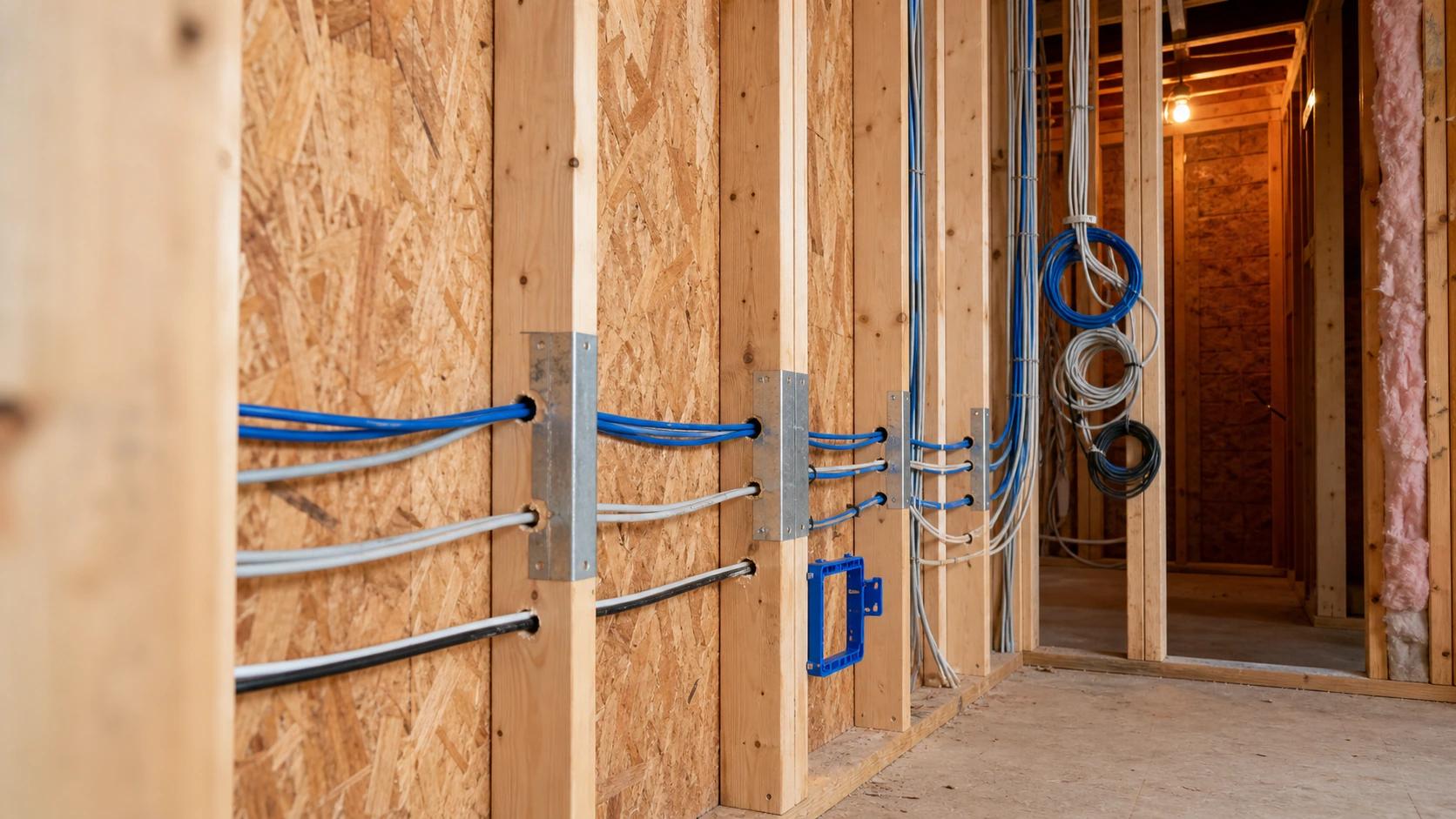
Ethernet cabling installed while walls are still open.
Key Takeaways
- The internet entry point does not have to be the Wi-Fi location.
- Run Ethernet during renovation to fixed devices and likely access point locations.
- One well-positioned access point may be enough for a small open apartment; larger or complex layouts may need two or more.
- 5 GHz performance depends heavily on distance, walls and placement.
- Network equipment can often be hidden, but Wi-Fi access points should be placed for coverage first.
- Plan the layout first; choose exact hardware afterwards.
Table of contents
Why Plan the Network Before Renovation?
While walls and ceilings are still open, adding Ethernet is usually simple. After painting, built-in furniture and finished ceilings are in place, the same cable can mean drilling, visible trunking or reopening finished surfaces.
The network may also grow. Today you may need only Wi-Fi and a TV; later you may add a home office, NAS, cameras, video doorbell or other fixed devices. The goal is not to predict every future gadget, but to leave useful wired paths.
Why Should the Internet Entry Point Not Decide Wi-Fi Placement?
A common layout is: internet enters near the front door, the router is placed in a cabinet next to it, and the signal must cross several walls before reaching the rooms where Wi-Fi is actually used.
The internet connection may be fine, but the Wi-Fi placement is poor. Distance, reinforced concrete, metal and other obstacles weaken Wi-Fi. Separate two questions: where does the internet enter, and where should wireless coverage come from? They do not need the same answer.
How Do You Choose a Central Network Point?
A practical design uses a small central network point where the ISP connection arrives and where Ethernet cables from the home are terminated. Depending on the setup, it can contain ISP equipment, a router or gateway, a switch and patch connections.
This equipment can often be hidden in a technical cabinet. The main Wi-Fi access point is different: if it provides most of the wireless coverage, hiding it inside a metal cabinet or deep niche can undermine the whole design.
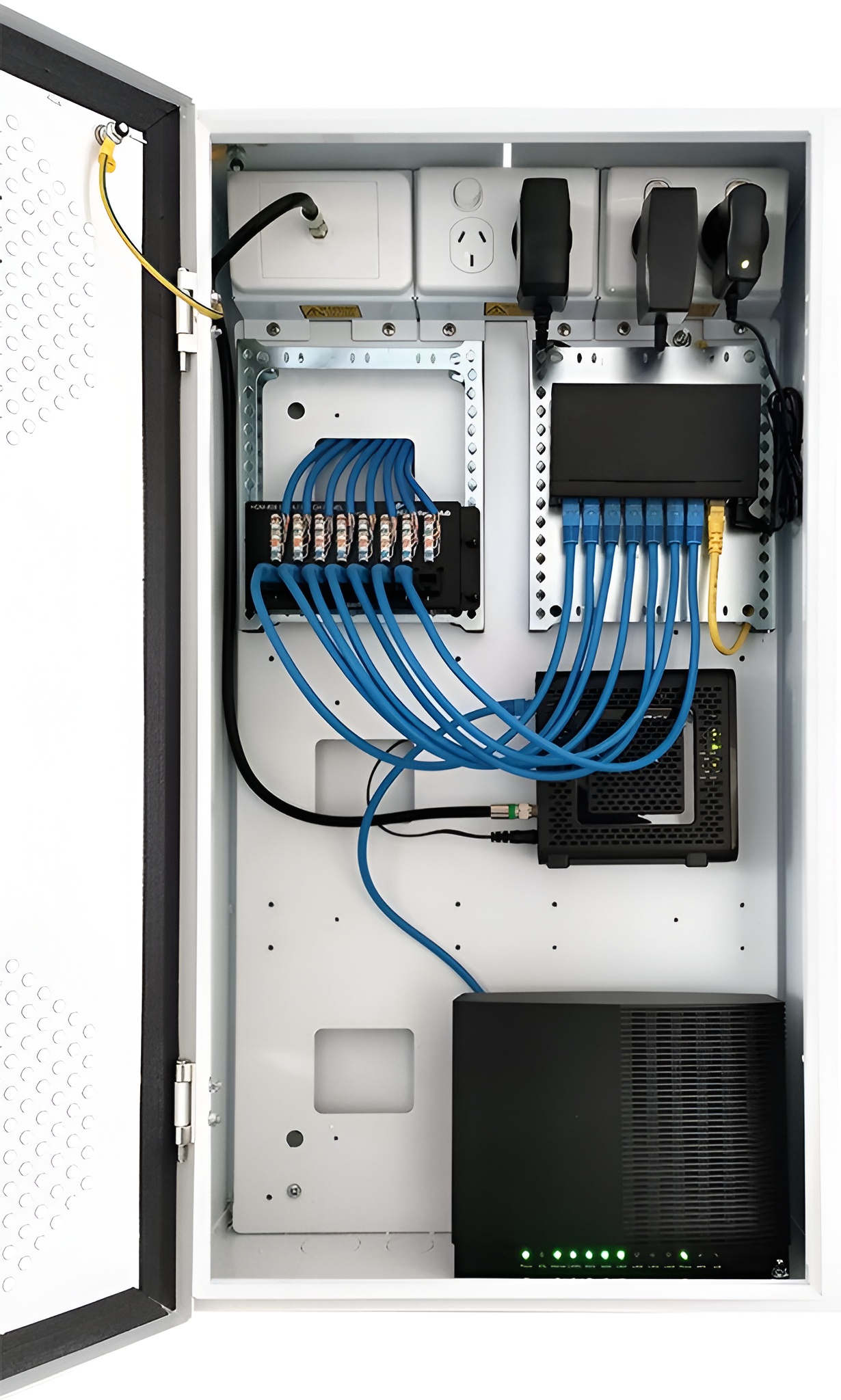
Central home network cabinet.
Where Should You Run Ethernet?
Prioritise places where wired connectivity is useful or where Wi-Fi infrastructure may be installed:
- Home office or work desk
- TV and media area
- Planned Wi-Fi access point locations
- Network-attached storage (NAS), cameras, video doorbell or other fixed devices
- Rooms that may later change purpose
At important locations, especially planned access point positions, it can also make sense to run a second spare Ethernet cable. During renovation, the extra cable costs relatively little, but it can save much more work if the network needs to be expanded or repaired later.
For new residential cabling, Cat 6 is a sensible baseline in many cases. The important part is creating proper cable routes while doing so is still easy.
Where Should Wi-Fi Access Points Be Placed?
Choose access point locations based on the areas that need coverage, not on the nearest convenient socket. A central, open position is often a good starting point, but the best location depends on the layout, walls and other obstacles.
For larger or more complex homes, Wi-Fi planning tools and coverage heat maps can help estimate signal distribution and choose access point locations before installation. Many Wi-Fi vendors provide tools for this purpose, helping reduce dead zones and create more consistent coverage throughout the home.
Central does not mean the exact geometric centre. The goal is to place access points where they can cover the required areas with as few major obstacles as practical.
When Is One Access Point Enough?
A small apartment with an open layout may work perfectly well with one correctly positioned access point. Do not add hardware if one device already provides stable coverage.
When Should You Plan for a Second Access Point?
Consider a second location for long or L-shaped apartments, multiple floors, thick structural walls or important rooms separated by several obstacles. Even if the second access point (AP) is not installed now, running Ethernet to a possible future location during renovation gives you an easy upgrade path.
Why Does 5 GHz Make Placement More Important?
5 GHz is widely used for high-performance Wi-Fi, but higher frequencies generally lose usable signal faster through distance and obstacles than 2.4 GHz. A fast modern router placed badly can therefore perform poorly in the far side of a home.
The practical fix is usually better placement or another access point - not simply buying a router with a bigger number on the box.
How Should Power and PoE Be Planned?
An access point needs a network connection and power. You can use a nearby electrical outlet, or Power over Ethernet (PoE) when the equipment supports it.
PoE is useful for ceiling or hallway APs because one Ethernet cable can carry both data and power. It is not mandatory: the access point, switch or injector must support the correct PoE type and power level.
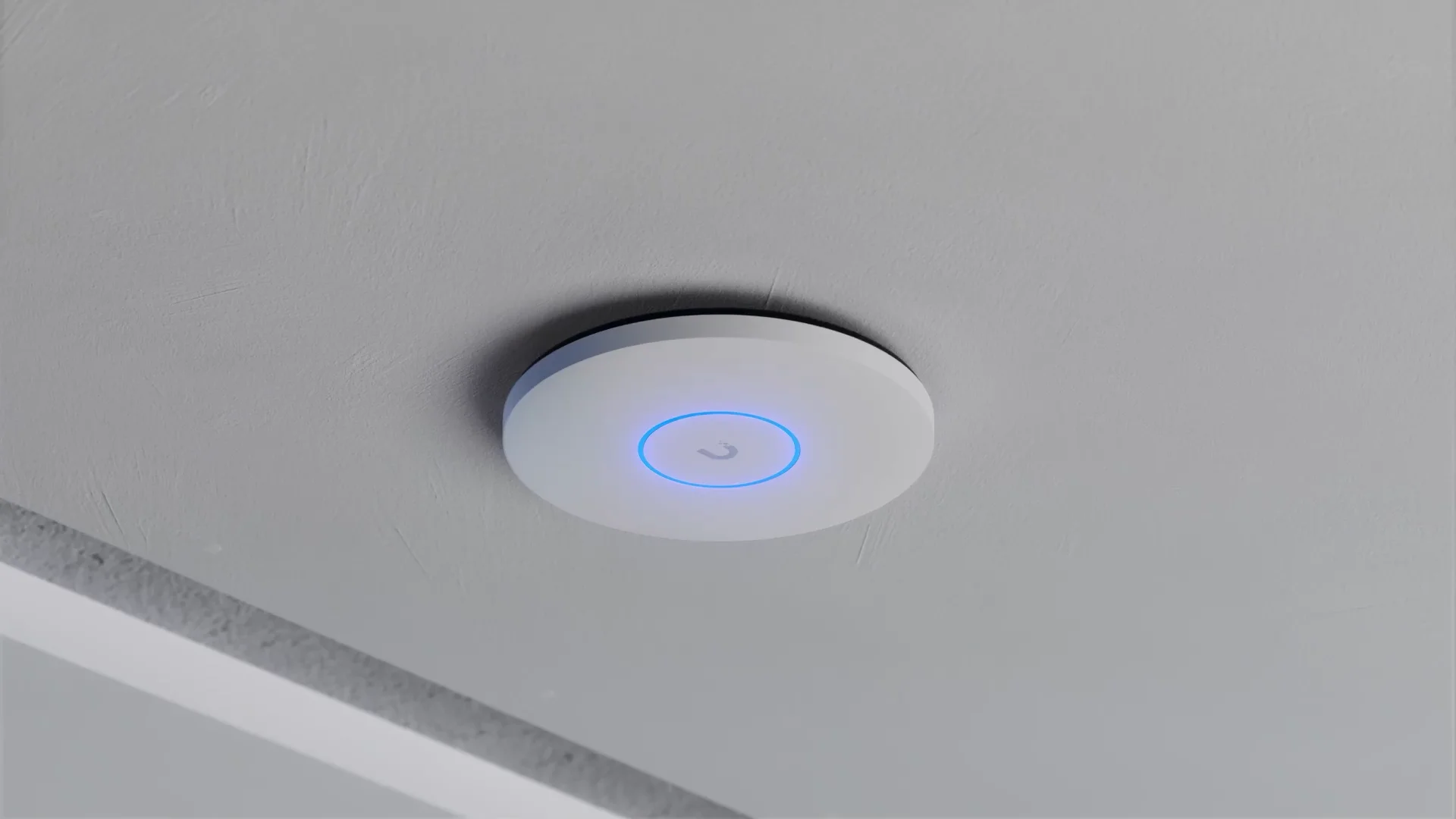
PoE-powered ceiling access point.
A Practical Apartment Example
Imagine the internet connection enters next to the front door. Instead of making that point responsible for the whole apartment's Wi-Fi, the connection terminates in a small network cabinet.
During renovation, Ethernet is run from that cabinet to the home office, the TV area and an access point closer to the centre of the apartment. If the layout is large or difficult, one extra cable is reserved for a second AP.
The architecture stays simple: ISP connection -> central network point -> Ethernet -> fixed devices and Wi-Fi access points.
After-the-Fact Setup vs. Planned Network
| Feature | Afterthought setup | Planned network | Why it matters |
| ISP entry | Also becomes Wi-Fi location | Feeds central network point | Wi-Fi can be placed independently |
| Wi-Fi | One router where cable ends | AP placed for coverage | Fewer walls and obstacles |
| Ethernet | Added after problems appear | Main runs installed during renovation | Less drilling later |
| Expansion | Visible cabling or compromises | Spare Ethernet runs planned | Easier future changes |
| Power | Solved after installation | Outlet or PoE planned | More AP placement freedom |
What Does Good Planning Solve - and What Does It Not?
Good cabling and AP placement give you cleaner expansion paths and more predictable coverage. They do not fix a slow ISP connection, strong interference, poor configuration or an old client device. Infrastructure creates the foundation; equipment still has to be selected and configured correctly.
What Should You Check After Installation?
- Signal level and stability in important rooms
- Real download and upload performance
- Latency during calls, gaming or remote work
- Whether connections drop or slow down when moving through the home
Pre-Renovation Checklist
- Mark where the ISP connection will enter.
- Choose a central point for the router, switch and cable terminations.
- Identify work desks, TVs and other fixed devices.
- Run Ethernet to planned access point locations.
- Consider a second AP cable for large, long, multi-storey or wall-heavy layouts.
- Do not plan the main Wi-Fi AP inside a cabinet or deep niche.
- Decide how access points will be powered and whether PoE is useful.
- Leave spare switch capacity and realistic expansion options.
- Test Wi-Fi where it will actually be used.
Conclusion
A good home network starts with the floor plan, not with the search for the most powerful router.
If you decide where Ethernet and Wi-Fi access points should be before renovation is finished, you can change routers, switches and APs later without changing the basic infrastructure.
The ISP cable may enter next to the front door. Your Wi-Fi does not have to start there.


